
Jira Workflow Assistant
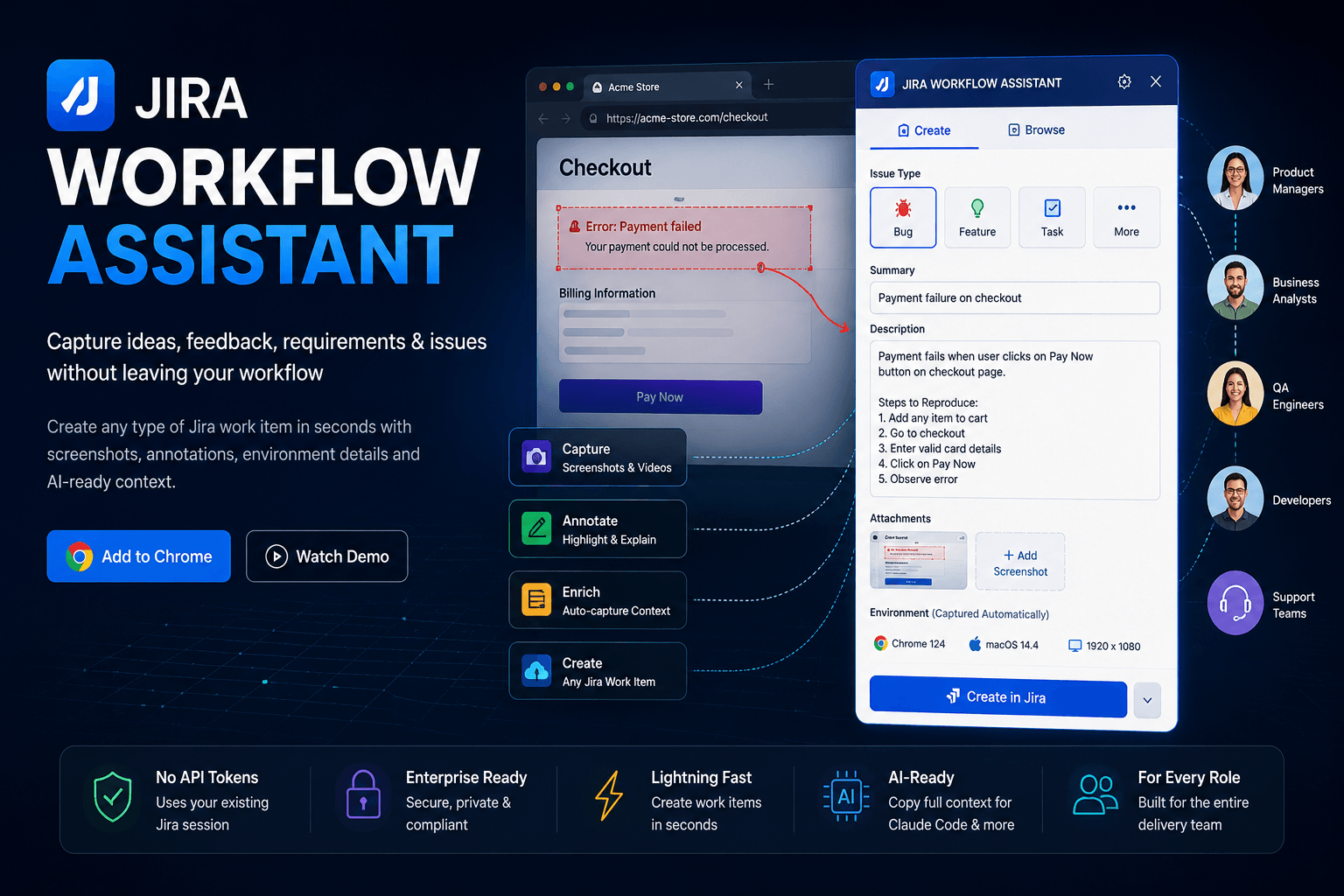
Capture Ideas, Feedback, Requirements & Issues Without Leaving Your Workflow
Transform observations into actionable Jira work items in seconds. Capture feature requests, customer feedback, requirements, tasks, enhancements, bugs, and delivery insights directly from any website or application.
A Delivery Layer For Modern Teams
Modern software delivery involves Product Managers, Product Owners, Business Analysts, QA Engineers, Developers, Customer Support Teams, and Project Managers.
Unfortunately, valuable information often gets lost between meetings, screenshots, emails, chat messages, spreadsheets, and ticketing systems.
Jira Workflow Assistant creates a seamless bridge between observation and execution by allowing teams to capture information at the moment it is discovered and transform it directly into structured Jira work items.
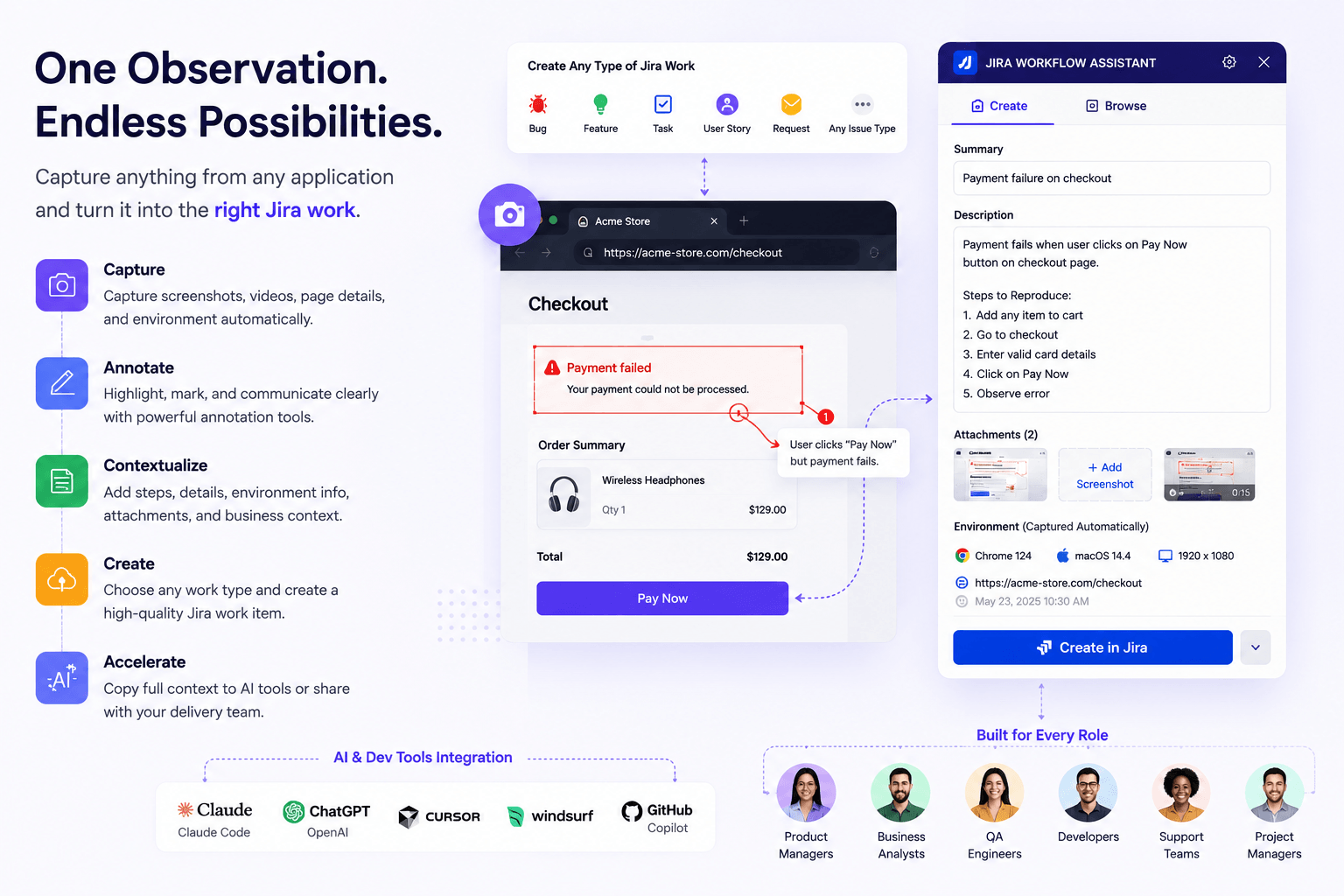
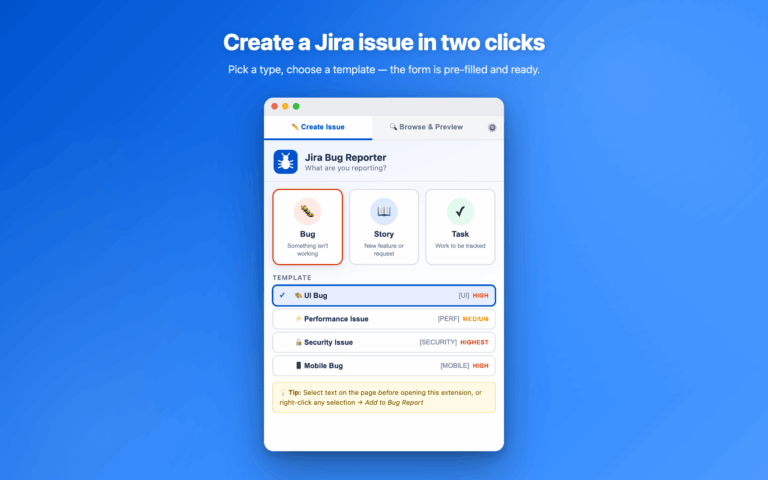
Create Any Type of Jira Work Item
Not everything is a bug.
Modern delivery teams need to capture many different types of work.
Supported Work Items
- Feature Requests
- Product Ideas
- Enhancements
- User Stories
- Requirements
- Tasks
- Customer Feedback
- Support Escalations
- Bugs
- Performance Issues
- Security Findings
- UAT Observations
- Release Validation Findings
- Custom Jira Issue Types
The platform adapts to your Jira workflow instead of forcing you into a predefined process.
capture Context Automatically
High-quality work items require high-quality context.
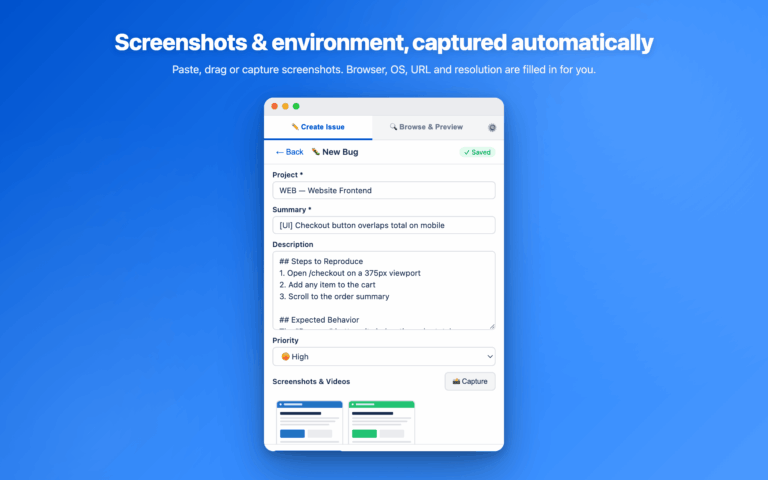
Jira Workflow Assistant automatically captures technical and environmental information to eliminate manual documentation.
Auto-Captured Information
- Current URL
- Page Title
- Browser Information
- Operating System
- Screen Resolution
- Timestamp
- Session Context
- Selected Page Content
Every ticket includes the information required for faster understanding and execution.
Screenshot, Videos & Visual Feedback
Capture what you see.
Communicate clearly.
Visual Documentation Features
- Screen Capture
- Screenshot Uploads
- Clipboard Paste
- Video Attachments
- Drag & Drop Uploads
- Multi-File Support
Turn observations into actionable work items with complete visual context.
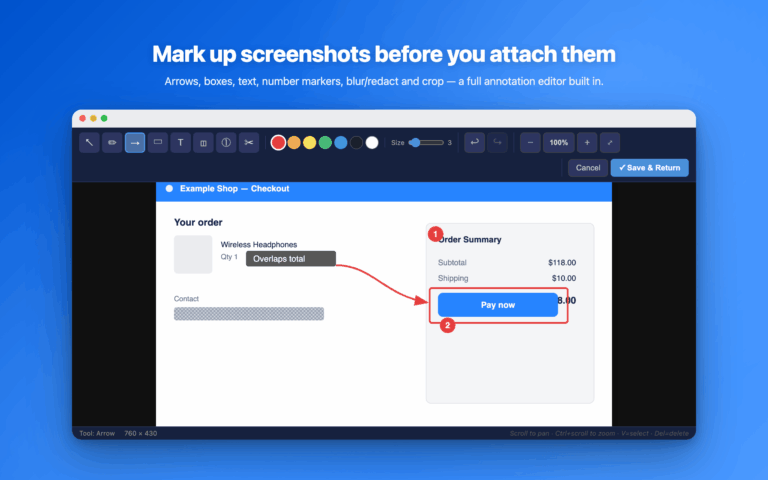
Built-In Annotation Studio
Explain exactly what needs attention.
Annotation Tools
- Arrows
- Boxes
- Text Labels
- Highlight Areas
- Numbered Steps
- Blur Sensitive Information
- Redaction Tools
- Cropping
- Zoom Controls
- Undo & Redo
Perfect for requirements, UX reviews, bug reports, stakeholder feedback, and quality assurance processes.
Product Feedback Made Actionable
Ideas often appear while reviewing live products.
Instead of capturing screenshots and creating tickets later, teams can instantly convert observations into structured Jira work items.
Ideal For
- Product Discovery
- UX Improvements
- Conversion Optimization
- Feature Requests
- Roadmap Inputs
- Customer Feedback Collection
- Stakeholder Reviews
Capture ideas when they happen.
Requirement Capture For Business Teams
Business Analysts and Product Owners constantly identify improvements, gaps, and new requirements.
Jira Workflow Assistant enables teams to document requirements directly from live systems, prototypes, and applications.
Common Use Cases
- Requirement Gathering
- Gap Analysis
- Process Reviews
- User Acceptance Testing
- Workflow Documentation
- Business Process Improvements
Reduce documentation effort while improving requirement quality.
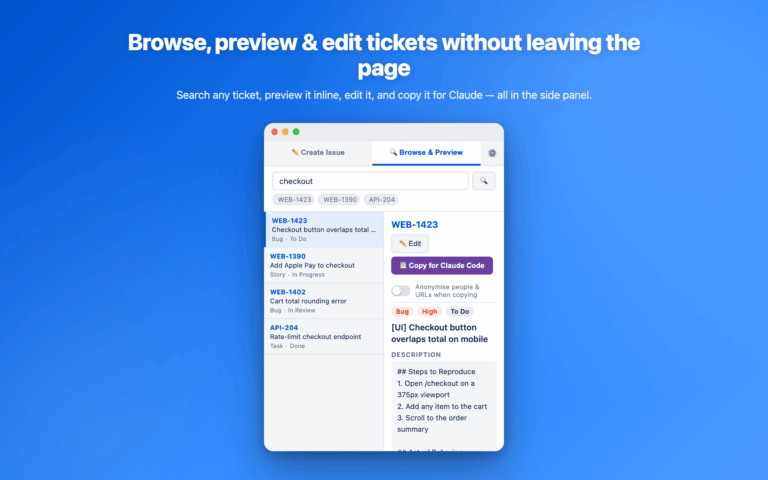
Browse, Preview & Manage Jira Work
Stay in context.
Built-In Jira Workspace
- Search Work Items
- Browse Existing Tickets
- Preview Details
- Edit Summaries
- Update Descriptions
- Manage Priorities
- Review Statuses
- Continue Existing Conversations
No need to constantly switch between browser tabs and Jira screens.
AI-Ready Delivery Workflows
Built for modern AI-assisted teams.
One-Click Context Transfer
Send complete Jira context directly into:
- Claude Code
- ChatGPT
- Cursor
- Windsurf
- GitHub Copilot
- Internal AI Assistants
- …
Include descriptions, comments, screenshots, attachments, and supporting context automatically.
Accelerate analysis, implementation, and issue resolution.
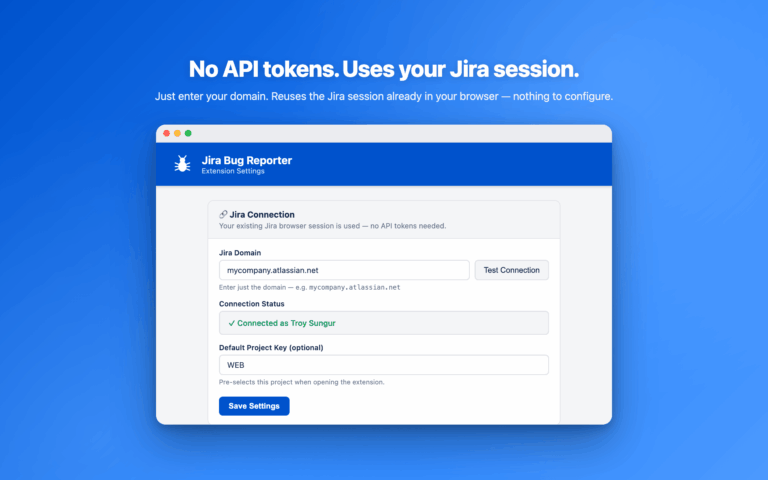
No API Tokens No Complex Configuration
Get started in less than a minute.
Setup Process
- Enter Jira Domain
- Test Connection
- Save Settings
- Start Capturing Work
The platform uses the Jira session already authenticated in your browser.
No API tokens.
No OAuth setup.
No developer involvement.
Delivery Collaboration ReImagined
Jira should not be a tool used only by engineering teams.
Jira Workflow Assistant empowers every stakeholder involved in product delivery to contribute effectively through structured, context-rich work items.
Business Benefits
- Better Jira Ticket Quality
- Faster Work Item Creation
- Improved Cross-Team Collaboration
- Better Requirement Documentation
- Reduced Communication Gaps
- Faster Delivery Cycles
- Improved Backlog Quality
- Better Stakeholder Participation
- AI-Ready Delivery Processes
- Increased Team Productivity
Who is This For
Product Managers
Capture opportunities, improvements, and customer feedback.
Product Owners
Transform observations into prioritized backlog items.
Business Analysts
Document requirements and process improvements.
QA Engineers
Create complete bug reports and testing observations.
Project Managers
Improve project visibility and issue quality.
Developers
Receive richer work items with complete context.
Customer Support Teams
Escalate customer feedback into actionable Jira work.
Delivery Managers
Improve delivery efficiency and stakeholder collaboration.
Enterprise Teams
Standardize information capture across departments.
Enterprise Ready Security & Privacy
Built for professional teams and enterprise environments.
Security Principles
- No Third-Party Servers
- No External Analytics
- Direct Jira Communication
- Existing Jira Authentication
- Local Chrome Storage
- No Stored Passwords
- No API Token Storage
Your data stays within your Jira environment.
Delivery Collaboration For Modern Product Oranizations
Modern software teams generate thousands of observations, requirements, ideas, and issues throughout every project.
Jira Workflow Assistant creates a seamless bridge between discovery and execution, allowing stakeholders to capture information directly from websites, applications, prototypes, and business systems. The result is faster decision-making, higher quality Jira work items, improved stakeholder collaboration, and a more efficient path from observation to delivery.

Everything You Need to Know Before Installing
01 Is this only for bug reporting?
No. The platform supports feature requests, ideas, enhancements, requirements, tasks, feedback, support requests, bugs, and any Jira issue type.
02 Can product managers use it?
Absolutely. Product teams can capture feature ideas, UX improvements, roadmap opportunities, and customer feedback directly from live products.
03 Can business analysts create requirements?
Yes. Business Analysts can document requirements, process improvements, UAT findings, and workflow observations directly into Jira.
04 Does it support screenshots?
Yes. Screenshots, videos, drag-and-drop uploads, clipboard pasting, and visual annotations are fully supported.
05 Does it support claude code?
Yes. Complete Jira context can be transferred to Claude Code and other AI tools with a single click.
06 Does it require API Tokens?
No. The platform uses the Jira session already authenticated in your browser.
07 Does it work with custom Jira issue types?
Yes. It supports standard and custom Jira configurations.
08 Does it store data on third-party servers?
No. All communication occurs directly with your Jira environment.
09 Can we use it across multiple projects?
Yes. The platform works across Jira projects, teams, and delivery workflows.
Ready To Turn Observations Into Action?
Reach out to us!
Capture ideas, feedback, requirements, enhancements, and issues the moment they happen — and transform them into high-quality Jira work items without disrupting your workflow.